
There are various data types in Python. Some of the important types are listed below.
Number
there are mainly 3 types which include Integer, Float, and Complex.
x = 2 # int
y= 2.8 # float
z= 3j # complex
y= 2.8 # float
z= 3j # complex
print(type(x))
priprint(type(y))
print(type(z))
Out put
<class ‘int’>
<class ‘float’>
<class ‘complex’>
String
Like many other popular programming languages, strings in Python are arrays of bytes representing unicode characters. However, Python does not have a character data type, a single character is simply a string with a length of 1.
Strings are lists of characters. Any character that you can type from a computer keyboard, plus a variety of other characters, can be elements in a string. Strings are created by enclosing a sequence of characters within a pair of single or double quotes. Examples of strings include "marylyn","omg", "good_bad_#5f>!", "{0:0.8g}", and "We hold these truths ...". Caution: the quotes defining a given string must both be single or both be double quotes.
Strings can be assigned variable names
a = “My name is “
b= “ Hari”
Strings can be concatenated using the “+” operator:
c= a+b
Output
My name is Hari
Output
My name is Hari
In forming the string c, we concatenated three strings, a, b, and a string literal, in this case a space " ", which is needed to provide a space to separate string a from b.
You will use strings for different purposes: labeling data in data files, labeling axes in plots, formatting numerical output, requesting input for your programs, as arguments in functions, etc.
Because numbers—digits—are also alpha numeric characters, strings can be made up of numbers:
Example 1
print("Hello")
print('Hello')
Out put
Hello
Hello
Example 2
>>> a = 'hello'
>>> b = 'world'
>>> a[4],b[1]
('o', 'o')
>>> id(a[4]), id(b[1]), a[4] is b[1]
(4567926352, 4567926352, True)
>>> id('')
4545673904
>>> id('')
4545673904
Out put
Hello
Hello
Example 2
>>> a = 'hello'
>>> b = 'world'
>>> a[4],b[1]
('o', 'o')
>>> id(a[4]), id(b[1]), a[4] is b[1]
(4567926352, 4567926352, True)
>>> id('')
4545673904
>>> id('')
4545673904
List
a list is created by placing all the items (elements) inside a square bracket [ ], separated by commas.
It can have any number of items and they may be of different types (integer, float, string etc.).
# empty List
my_list = [ ]
# Integer list
my_list = [ 1,2,3,4,5,]
#List with integer and string
my_list [ 1, “hello world “, 3,4,5]
Nested List
my_list [ “my world” , [1’2,3,4,5], [‘a’] ]
Let’s take a simple example:
colors = ['red', 'green', 'blue', 'yellow', 'white', 'black']
Here we defined a list of colors. Each item in the list has a value(color name) and an index(its position in the list). Python uses zero-based indexing. That means, the first element(value ‘red’) has an index 0, the second(value ‘green’) has index 1, and so on.
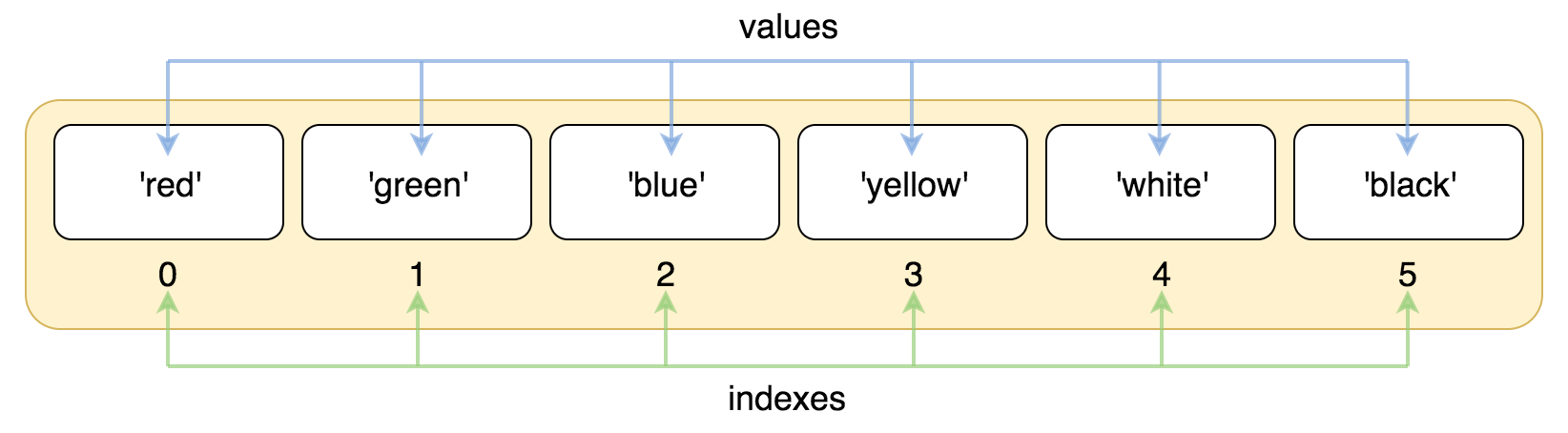
To access an element by its index we need to use square brackets.
- >>> colors = ['red', 'green', 'blue', 'yellow', 'white', 'black']
- >>> colors[0]
- 'red'
- >>> colors[1]
- 'green'
- >>> colors[5]
- 'black'
Negative indexes
Using indexing we can easily get any element by its position. This is handy if we use position from the head of a list. But what if we want to take the last element of a list? Or the penultimate element? In this case, we want to enumerate elements from the tail of a list.
To address this requirement there is negative indexing. So, instead of using indexes from zero and above, we can use indexes from -1 and below.
To address this requirement there is negative indexing. So, instead of using indexes from zero and above, we can use indexes from -1 and below.
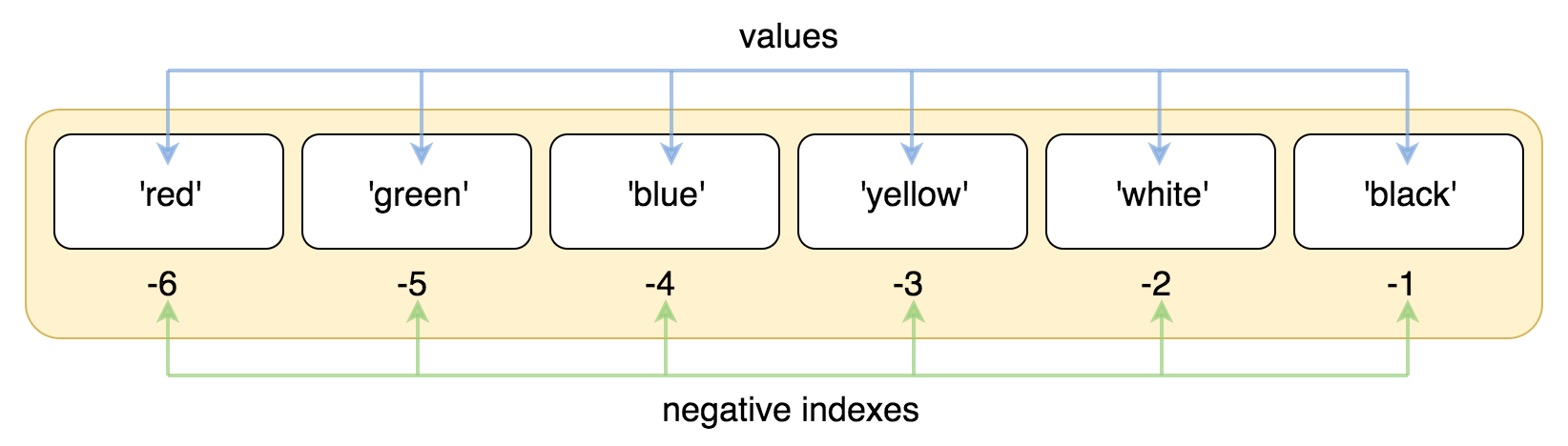 In negative indexing system -1 corresponds to the last element of the list(value ‘black’), -2 to the penultimate (value ‘white’), and so on.
- >>> colors = ['red', 'green', 'blue', 'yellow', 'white', 'black']
- >>> colors[-1]
- 'black'
- >>> colors[-2]
- 'white'
- >>> colors[-6]
- 'red'
Tuples
A tuple is a collection which is ordered and unchangeable. In Python tuples are written with round brackets.
Example
mytuple= ("Berlin", "Paris", "Rome")print (mytuple)Output(‘Berlin’, ‘Paris’,’Rome’)OutputRomeOnce in a while, it is useful to swap the values of two variables. With conventional assignment statements, we have to use a temporary variable. For example, to swap a and b:

No comments:
Post a Comment